Software Downloads for ARKU Deburring Tools
Thank you for your interest in ARKU's deburring tools. Here, you can access all the information needed to download your software.
How to Easily Install the Latest Abrasive Software on Your Machine
From Visu version 48_1 onwards, you have the convenient option of loading the latest software for your abrasive tools onto your deburring machine using a USB stick. This becomes particularly useful if the tool software was not pre-installed in the tool memory when your deburring machine was delivered - for example, when acquiring a special abrasive tool. Similarly, it may be necessary to reload the current software version of the deburring tools onto your machine when introducing new abrasive tools or making changes to existing ones.
1. Download the abrasive software onto a USB stick
-
For each abrasive tool, you will receive a dedicated link to a zip folder.
-
Unzip the zip folder and save it onto a USB stick.
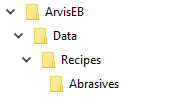
- Important: Only one abrasive tool folder can be used per USB stick. The folder names must follow the format shown below. It is particularly important to make sure that the top folder is named "ArvisEB" without any additional numbers, etc.
- Using the USB stick, you can effortlessly load the abrasive software onto your deburring machine. (See step 2).

2. Install the software onto your deburring machine
-
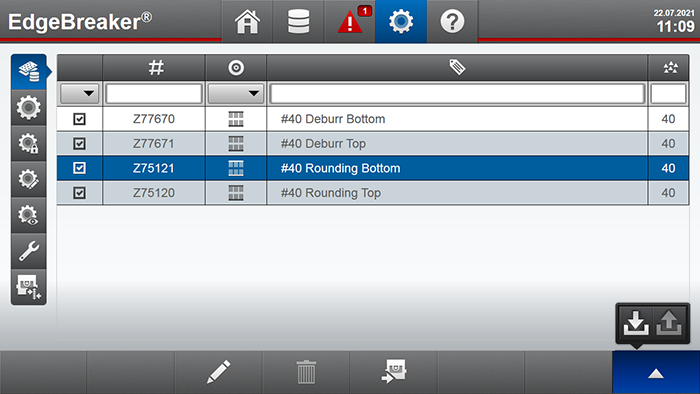
Access the Service menu on the touch screen of your deburring machine.

Downloads.

- Access the Service menu on the touchscreen of your deburring machine.
-
Connect the USB stick to the USB port of your machine (located behind the touchscreen of the EdgeBreaker 6000). Please keep in mind that you can only save one abrasives folder per upload on the USB stick. If you have multiple abrasive files, please upload them one by one or use multiple USB sticks.
-
Tap on the touchscreen to access the "ABRASIVES" button.
-
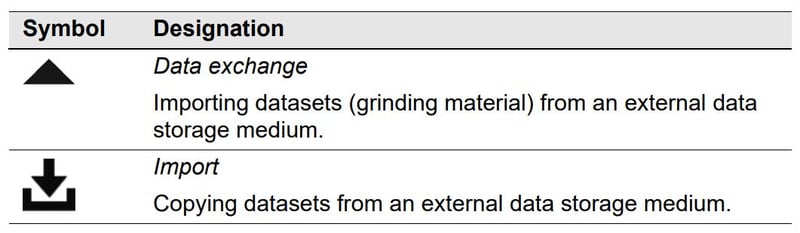
Access the DATA EXCHANGE function.
-
Tap on the IMPORT button.
-
Follow the prompts on the touchscreen interface.
-
If the abrasive data is already present in the machine, it will be overwritten. Confirmation is required to proceed with the overwrite.
Additional Information.
Kontakt.
Customer Hotline.
We are available around the clock, 7 days a week with our hotline*.
*Cost: 14 cents per minute from German landlines. Calls from mobile networks cost a maximum of 42 cents per minute.
Ihr Weg zu uns.
Are you planning a visit to our headquarters in Baden-Baden? Let us guide you on the best ways to reach us, whether it's by car, train, or plane. We look forward to welcoming you!